

Rust Server Hosting Plan
One plan, unlimited flexibility. Start small and scale CPU, RAM and disk instantly from the panel as your map grows.
Configure Your Server, See Your Price
Why Is Setting Up a Rust Server So Easy?
No more wrestling with SteamCMD, Linux commands or editing server.cfg by hand. With the Verunix Easy Setup Panel, just pick a Vanilla, Oxide (uMod) or Carbon setup from the list and install it in one click; your Rust server is live within minutes. Everything is managed from your browser, on any device you like.
RCON console, file manager, wipe schedule and one-click backups are ready in the panel. You can edit server.cfg settings from your browser, such as gather rate and stack size, and thanks to our data center in Turkey, give your players a seamless experience with sub-5ms ping.
- One-click setup: Vanilla, Oxide (uMod) or Carbon; switching frameworks is one click too
- Unlimited plugin support: Upload plugins like ZLevels, Kits, Clans and BackpackPro via drag and drop in the panel
- Automatic wipe schedule: Schedule Force Wipes, BP Wipes and Custom Wipes down to the hour
- Live RCON console and file manager: Send commands, watch logs and edit all config files from your browser
- One-click backup & restore: Your world and building files are backed up from the panel; if something goes wrong, roll back in seconds
- Custom map & RustEdit support: Beyond Procedural Map, you can upload custom maps (Hapis Island, Savas Island, etc.)
- Rust-specific DDoS protection: 24/7 protection against UDP floods, raid-rage attacks and query exploits
Rust Server Hosting with the Verunix Easy Setup Panel
The Verunix Easy Setup Panel is a modern web panel for managing your Rust server from your browser. Starting the server, wipes, plugin installs, config editing, backups and every other task are gathered on a single screen; no Linux knowledge or command-line experience required.
Ease of use doesn't come at the cost of performance: every server runs with isolated resources on AMD Ryzen 9 5950X infrastructure, one of the fastest processors on the market. No rubber-banding and no sudden FPS drops.
With fast Asset Warming powered by NVMe SSDs and the low-ping advantage of our data center in Turkey, a premium Rust server hosting experience is guaranteed.

How Does One-Click Rust Server Setup Work?
Setting up a Rust server used to take hours: SteamCMD, Linux commands, port forwarding and server.cfg... The Verunix Easy Setup Panel automates the entire process. As soon as your payment is confirmed, you log in to your panel and find your server ready.
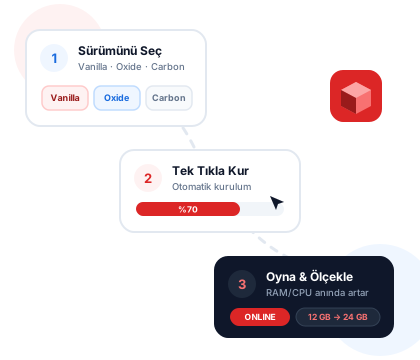
In the panel, choose a Vanilla, Oxide (uMod) or Carbon setup and install it in one click. Set your map size, gather rate and wipe schedule from the panel; uploading a custom map (RustEdit) is still just one click.
On top of that, your plan never holds you back: resources are scalable. Start with a small map, and as your community grows, upgrade RAM and CPU; your world files, plugins and settings stay exactly as they are.
- Hours of manual setup
- SteamCMD & Linux knowledge required
- Fixed hardware, migration hassles
- One-click setup in minutes
- No technical knowledge required
- Resources scale instantly
Extra Power, Extra Convenience
The features included in Verunix Rust server plans are designed for an unmatched server experience.
DDoS Game Protection
Rust protocol-specific filtering at Layer 3 and 4. Even if rivals try to take your server down, players keep playing without lag.
NVMe SSD Infrastructure
Map loading (Asset Warming) is 5x faster than on traditional disks. Large maps and reconnects complete instantly.
OxideMod / Carbon Support
Full support for Oxide (uMod) and Carbon plugins. Install any plugins you want in one click and run vanilla or modded.
Automatic Wipe Schedule
Set up an automatic schedule for Full Wipes (Map + Blueprint) or Map Wipes only. Periodic resets are easy to manage from the panel.
Automatic Backups
Daily snapshots keep your Rust world and building files safe. After a problem, restore with one click and never lose data.
24/7 Rust Experts
Not generic technical support, but a team of Rust experts. We're there for you even with OxideMod setup, server.cfg and wipe settings.
Rust Servers: Map Size, Wipe Cycles and Hardware
Rust is one of the most resource-hungry game servers out there: without proper planning, there's no good experience.
Map Size and RAM
On a Rust server, RAM requirements are driven more by map size and entity count than by player count. A 3000-size (3k) map consumes 6-8 GB of RAM even when empty; as players build, the entity count climbs into the hundreds of thousands and usage settles in the 12-16 GB range. This is the main cause of performance loss on servers that go a long time without a wipe. A weekly/biweekly map wipe and a monthly BP wipe cycle is the standard for both the meta and performance.
Oxide & Carbon Plugins
On the plugin side, Oxide (uMod) is still the most widely used framework, while performance-sensitive servers are moving to Carbon. Popular plugins like Kits, Teleportation and Clans put more pressure on memory than on the CPU; the real CPU load comes from AI (scientists, Bradley) and active raid periods. Processors with high single-core performance pay off here too, and our scalable Ryzen 9 based plan is built exactly for this scenario.
Wipe Cycles and Protection
Rust communities are among the most frequent targets of DDoS attacks. At Verunix, all game servers run behind DDoS protection; we also recommend opening the Rust+ app port and RCON access only to the IPs that need them.
Recommended Starting Resources
Our web panel plan isn't fixed: start small and scale RAM and CPU instantly from the panel as your map and player count grow.
50 players · 3k map
4 vCPU · 12 GB RAM · 80 GB NVMe
100 players · 3.5k map
6 vCPU · 16 GB RAM · 100 GB NVMe
150-200 players · 4k map + plugins
8 vCPU · 24-32 GB RAM · 120 GB NVMe
These values are only starting recommendations; upgrades are applied within minutes with your world and building files preserved. Our support team will guide you on modded vs. vanilla, your wipe schedule and your plugin setup; if you like, compare all game server options.
Frequently Asked Questions
Everything you want to know about Rust server hosting.





When you click, the question is sent over automatically and answered.
Choose a service
Let's find the best plan for you with a few quick questions.