


Spin the Discount Wheel and your discount coupon lands in your account instantly! Spin the Wheel
Türkçe Domain
Theme
Client Login Create New Account
Layer7 Protection · Layer 4 Protection · WAF

Layer7 DDoS Protection: Attacks Stop Before They Reach Your Server

Every HTTP request to your website passes through our filtering network first. Bot and flood traffic is filtered out, suspicious clients are sent to a verification page, and only real visitors reach your server. No software installation is needed for setup; just point your DNS record.

Layer7 Firewall Filters HTTP/HTTPS floods and bot traffic
Layer 4 Protection Stops SYN and UDP floods at the network layer
Live Attack Dashboard Requests, challenges and blocks updated every 10 seconds
Custom Rules Geo-blocking, rate limits and path-based settings
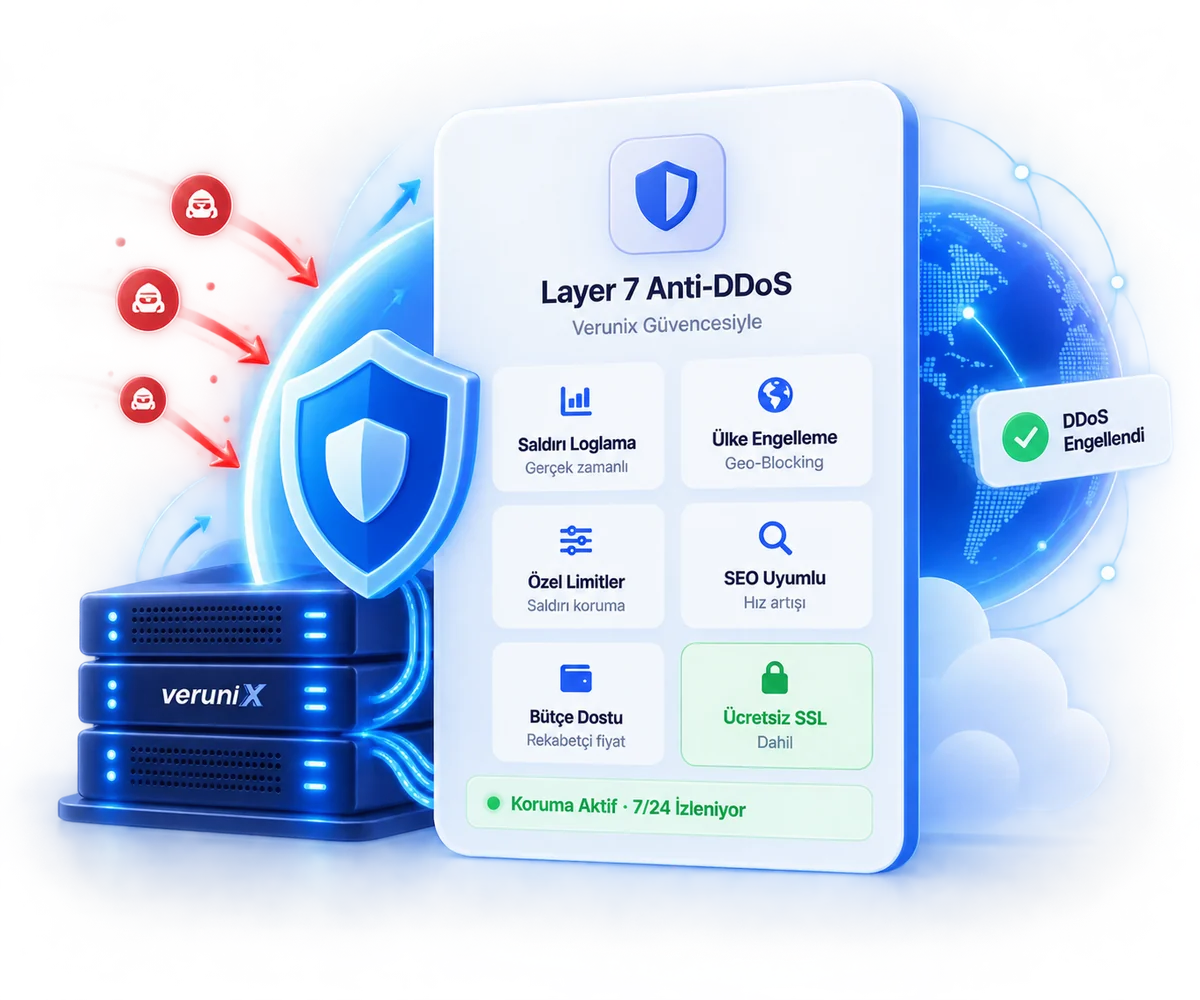
Verunix DDoS protection: real-time filtering against Layer 4 and Layer 7 attacks
  • DMCA protected badgeDMCA Protected
  • Premium quality badgePremium Infrastructure
  • Quality assurance badgeQuality Assurance

DDoS Protection Pricing

One plan, one fixed monthly fee. Layer7 and Layer 4 protection, WAF and the live attack dashboard are all included; your bill doesn't change when attacks get bigger.

Protection active · 24/7

Layer7 DDoS Protection Plan

Application and network layer protection for websites, e-commerce stores and game server sites.

2.449,90 TL /mo
VAT included · No extra charge based on attack size
1 Tbps+Protection capacity
99,9%Uptime guarantee
InstantActivation
Order Now Have questions? Check out the FAQ
Protection layers
  • Layer7 firewallHTTP/HTTPS floods and bot traffic
  • Layer 4 protectionSYN and UDP floods
  • WAFSQL injection and XSS attempts
  • Game protocol supportMetin2, FiveM, Minecraft, Rust
Control and visibility
  • Live attack dashboardGraph updated every 10 seconds
  • Up to 90 days of analyticsBreakdown by country, browser, IP and path
  • Geo-blockingCountry-based access rules
  • Custom limitsPath and rate-based rules
Service
  • 24/7 technical supportRule tuning during attacks
  • Free SSLCertificate included in the plan

An HTTP Flood Attack, Seen from the Protection Dashboard

The screenshots below were taken from the Verunix Layer7 protection dashboard and show a sample HTTP flood attack against a protected website. The last parts of the IP addresses have been masked for visitor privacy.

21,7 million
requests in 30 days
%78,5
blocked as malicious
1.778 req/s
load during the attack
0,2 req/s
traffic reaching the server
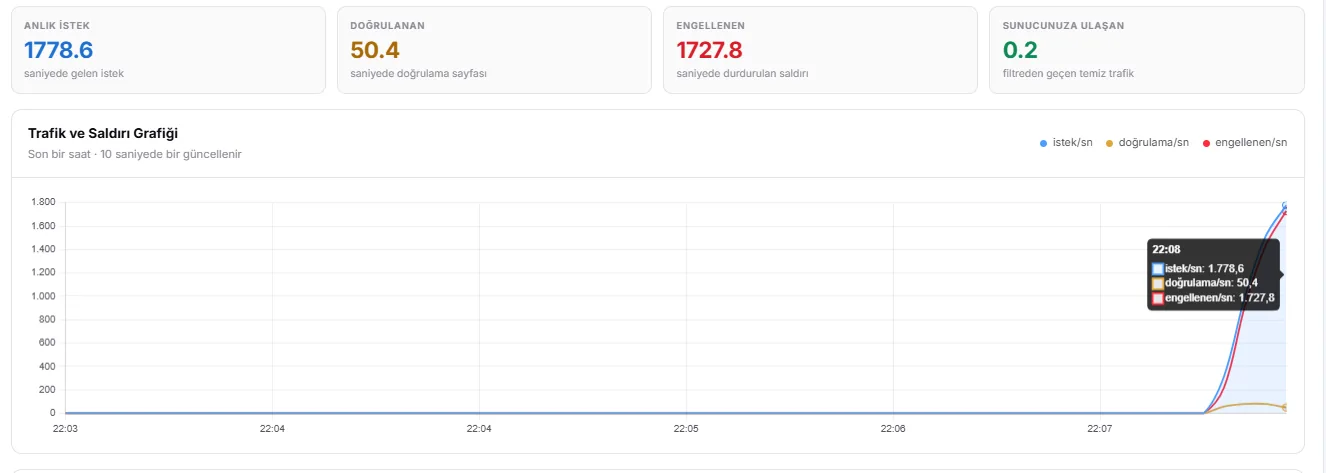
DDoS protection panel live traffic chart: 1,778 requests per second incoming, 1,727 blocked, 0.2 requests reaching the server
Live traffic graph. As soon as the attack starts, requests per second climb to 1.778 within a few seconds. Of these, 1.727 are blocked outright and 50 are sent to the verification page, while the clean traffic reaching the server stays at 0,2 requests per second.
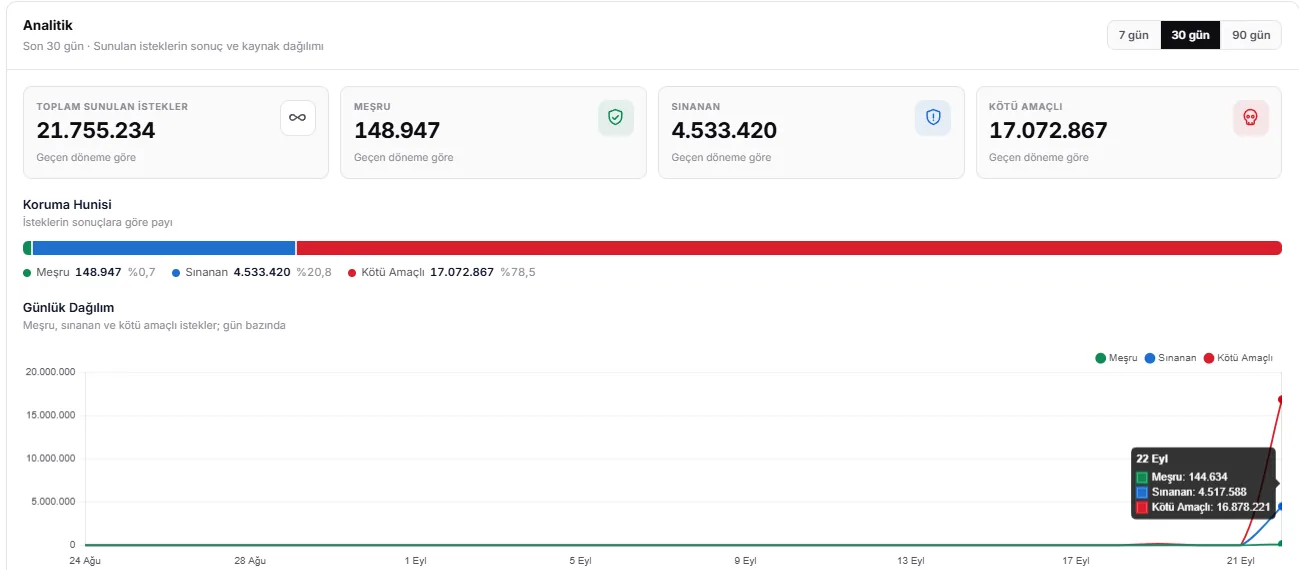
DDoS protection analytics screen: 21,755,234 requests in 30 days, 78.5% malicious, 20.8% challenged, 0.7% legitimate
Protection funnel. Of the 21,7 million requests over 30 days, 0,7% were legitimate, 20,8% were challenged with the verification page and 78,5% were malicious.
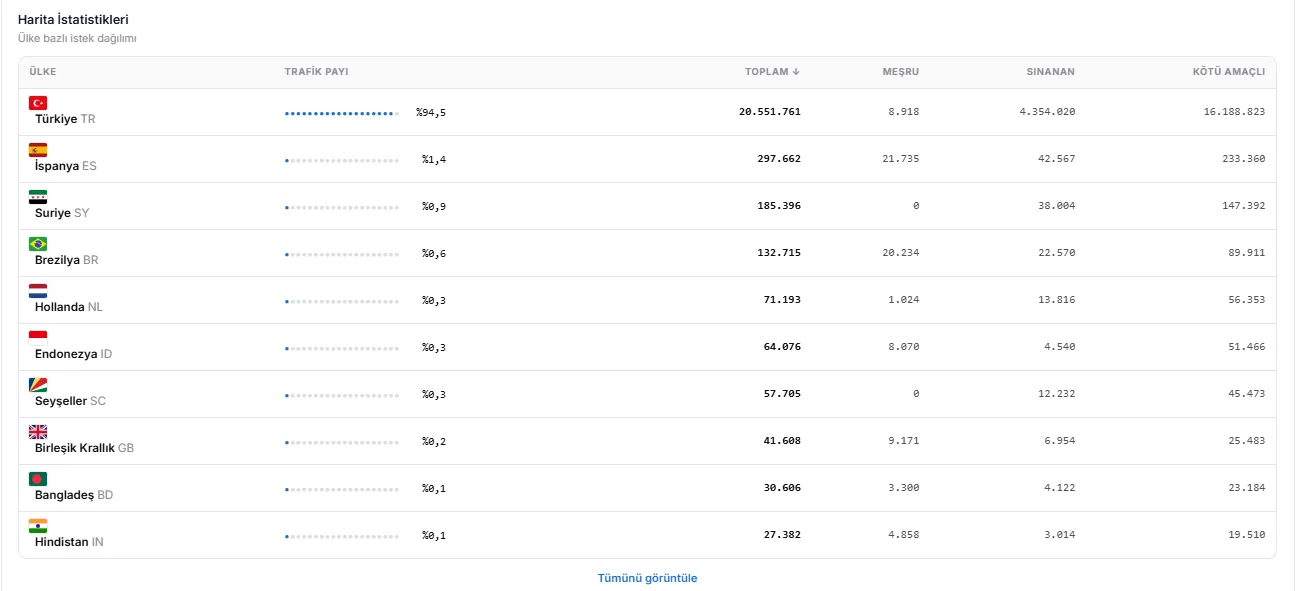
DDoS attack statistics by country: 94.5% of traffic originates from Turkey
Country breakdown. 94,5% of the attack traffic comes from Turkish IP addresses. A rule that only blocks traffic from abroad could not have stopped this attack.
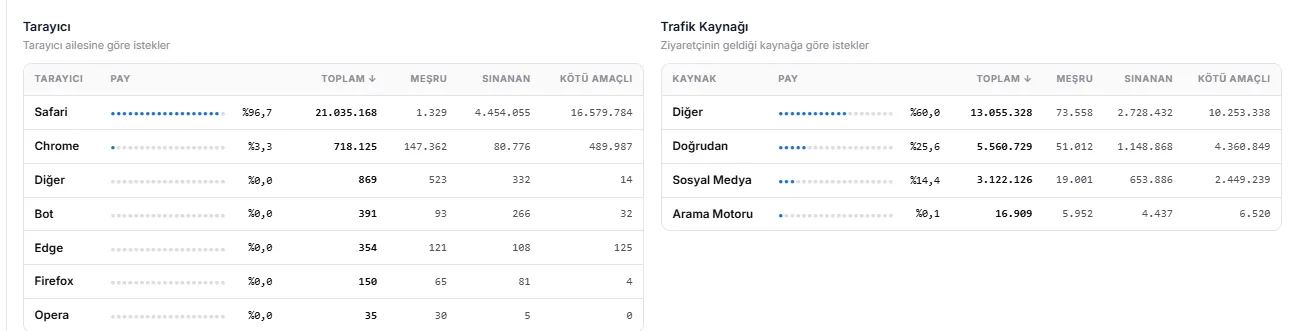
Browser breakdown: of 21 million requests identifying as Safari, only 1,329 are legitimate; bot traffic uses fake user agents
Browser breakdown. 21 million requests identify themselves as Safari, but only 1.329 of them turn out to be legitimate. The bots spoof their user-agent.
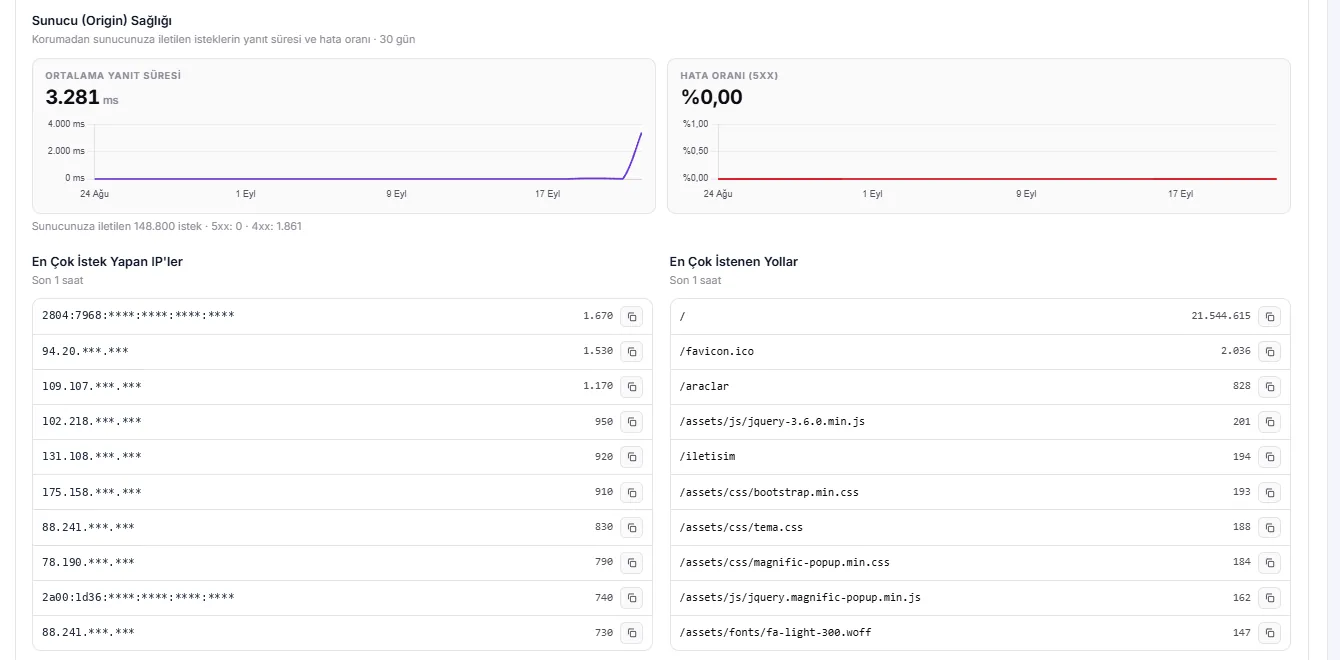
Origin server health screen: 0% 5xx error rate, top requesting IPs and most requested paths
Origin health. No 5xx errors occur on the server throughout the attack. Even the most active IP sent only 1.670 requests per hour.

What do these screenshots tell us?

  • Per-IP limits alone are not enough. The most active IP sends 1.670 requests per hour, which is less than half a request per second. That rate is too low to tell apart from a normal visitor. What makes the attack big is not individual IPs but the sum of thousands of them.
  • Geo-blocking alone is not enough. Botnet traffic comes largely from home and mobile connections in Turkey. A country block helps against attacks from abroad, but in this scenario it would also cut off real visitors.
  • User-agents can't be trusted. The attack traffic identifies itself as Safari. That's why Layer7 protection looks at how a client behaves, not at what it claims to be.
  • The target is a single path. Almost all requests go to the home page (/). That's why path-based rate limits and verification rules are critical.
We're Here
to Help!
Reach our live support line with any questions you have.
Live Support
Let us help you quickly
24/7 Technical Support
Always here for you
Instant Activation
Active within minutes

What Is DDoS Protection?

In a DDoS (Distributed Denial of Service) attack, traffic is sent to the same target from a large number of devices at the same time. The goal is not to steal data but to take the site offline for real visitors by exhausting bandwidth, the connection table, or the server's CPU and memory. These devices are mostly botnets made up of compromised computers, routers, IP cameras and rented servers.

DDoS protection is the layer that intercepts and cleans this traffic before it reaches the target. Traffic first arrives at the protection network, where attack packets and bot requests are separated out, and only clean traffic is forwarded to the server. No matter how large the attack, the load is carried by the protection network, not by your server.

Effective protection handles two layers together: volumetric attacks at the network layer (Layer 3/4), and HTTP requests that look like real users at the application layer (Layer7). If either one is missing, the attacker comes in through the other door.
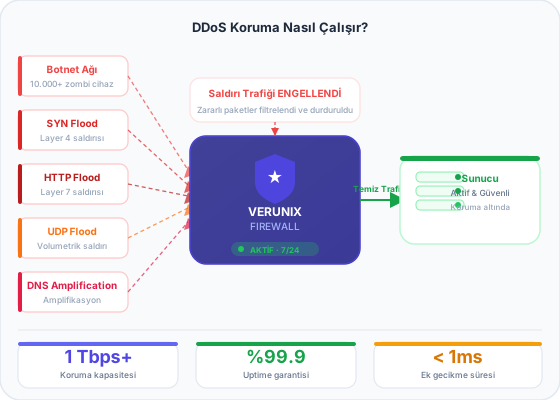
DDoS attack diagram: botnet traffic is filtered by the protection network and clean traffic is forwarded to the server

DDoS Attack Types: Layer 3, Layer 4 and Layer7

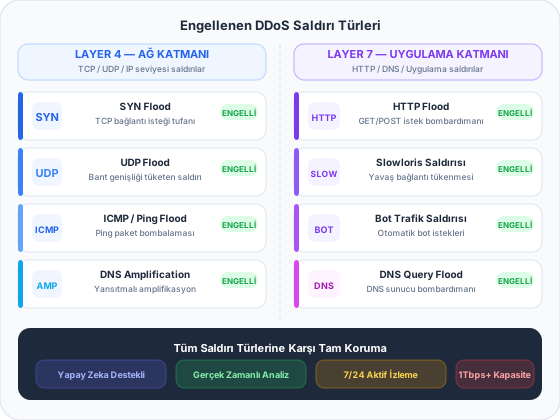
Attacks are grouped by which layer of the OSI model they target. Each group has different symptoms and different solutions, which is why not every service labeled "DDoS protected" stops the same attacks.

Network layer attacks rely on brute force and are measured in Gbps or Mpps. Application layer attacks, on the other hand, do a lot of damage with little bandwidth: a few thousand HTTP requests per second, each triggering a database-backed page load, can lock up a server within minutes.

DDoS attack types: Layer 3, Layer 4 and Layer 7 attacks
LayerWhat does it target?Example attacksHow is it stopped?
Layer 3
Network
Line capacity and routers ICMP floods, IP fragmentation attacks High-capacity uplinks, traffic scrubbing, ACLs
Layer 4
Transport
Connection table, ports SYN floods, ACK floods, UDP floods, DNS/NTP amplification (reflection) SYN cookies, protocol validation, packet rate limits
Layer7
Application
Web server, PHP, database HTTP GET/POST floods, Slowloris, cache bypass, search and login page load attacks Behavioral analysis, challenge pages, path-based rate limiting, Layer7 firewall rules

What Is Layer7 Protection and How Does It Work?

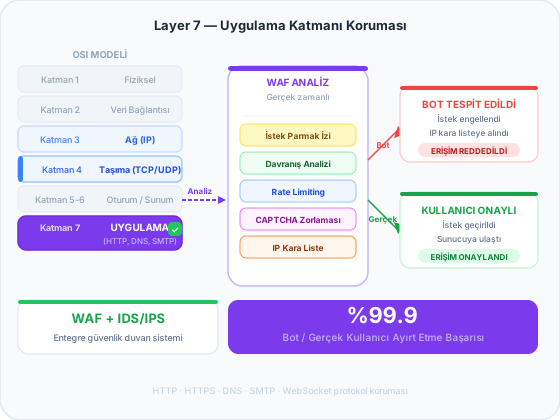
Layer7 protection (Layer 7 protection) works at the application layer, the 7th layer of the OSI model, which means at the level of HTTP and HTTPS requests. Attack packets at this layer are technically flawless: a valid TCP connection is established and a valid HTTP request is sent. Because there is nothing wrong with the packet itself, network layer filters cannot tell this traffic apart from a real visitor.

That's why Layer7 protection looks at the client's behavior rather than at a single request:

  1. Routing. Your domain's DNS record is pointed to the protection network. All requests to your site arrive here first, and your server's real IP address stays hidden.
  2. Reputation and consistency checks. The IP address's history, the network the connection comes from and whether the request headers are internally consistent are all examined. A client that claims to be Safari but doesn't behave like Safari gets flagged here.
  3. Rate and behavior analysis. The number of requests to the same path in a short time, requests per session and browsing patterns are measured. A client that keeps requesting the home page without ever loading CSS or images is not human.
  4. Challenge page. Suspicious clients are shown a short verification page. A real browser passes it in a few seconds, while simple bot scripts cannot. In the dashboard, these requests appear as "challenged".
  5. Forwarding clean traffic. Verified visitors are forwarded to your server. The server's response time and error rate are monitored from the dashboard.
Layer 7 protection flow: HTTP requests are analyzed, bot traffic is blocked, real visitors reach the server

What Is a Layer7 Firewall? How It Differs from a Traditional Firewall and a WAF

A traditional firewall looks at where packets come from and where they are going: source IP, destination port and protocol. Rules like "close all ports except 80 and 443" are written at this level. But an HTTP flood attack arrives on port 443, which is already open, using an allowed protocol, so from a traditional firewall's point of view everything looks normal.

A Layer7 firewall, on the other hand, reads the content of the request: the requested URL, HTTP method, headers, cookies, user-agent and request frequency. This makes it possible to write application-specific rules such as "challenge any client that sends more than 50 requests to the same search page within 10 seconds" or "allow access to /wp-login.php only from Turkey".

A WAF (Web Application Firewall) also works at the application layer, but its focus is different: it catches attack patterns in the request body, such as SQL injection and XSS attempts. In short, a Layer7 firewall inspects the volume and behavior of traffic, while a WAF inspects the malicious code within the request content. Strong protection uses both together.

Traditional firewall (L3/L4)Layer7 firewallWAF
What does it inspect?IP, port, protocolURL, headers, cookies, request rate, behaviorRequest body and parameters
What does it stop?Port scans, SYN/UDP floodsHTTP floods, bot traffic, scraping, brute forceSQL injection, XSS, exploit attempts
Blind spotCan't distinguish valid HTTP requestsCan't identify a single malicious request by its contentCan't handle high-volume floods on its own
In the Verunix plan Included Included Included

Who Needs DDoS Protection?

You don't have to be a big brand to get attacked. Because renting a botnet for an hour-long attack is cheap, competitors, disgruntled users and ransom groups target small sites too.

E-commerce sites

An hour of downtime during a sale means directly losing the orders sitting in shopping carts. Cart, search and checkout pages are attackers' favorite targets.

Game server sites

The websites, registration pages and item shop pages of Metin2, FiveM and Minecraft communities are frequently attacked by rival servers. For the game port itself, check out our protected game server solutions.

News and content sites

When a story breaks, real traffic and attack traffic get mixed together. Layer7 protection keeps the site up by letting real readers through and stopping bots.

API and SaaS applications

API endpoints that run expensive queries can wear down a server with only a small number of requests. Path-based limits let you protect each of these endpoints individually.

Corporate websites

An unreachable corporate website means lost reputation. Protection can be added without changing your current hosting provider.

Forums and communities

Search, registration and login pages are targets for both floods and brute force attempts. Dedicated challenge rules can be set for these paths.

How Do I Activate DDoS Protection?

Because the protection works as a reverse proxy, you don't need to install any software on your server or move your site. Activation usually takes just a few minutes:

  1. Purchase the plan. After activation, you'll receive a protected IP address and setup details.
  2. Point your DNS record. Change your domain's A record to this IP address. Once DNS propagation is complete, traffic starts passing through the protection network.
  3. Let's set up the rules together. Together with our technical team, we define country, path and rate rules based on your site's structure. You can then start monitoring your traffic live from the dashboard.

Common mistake: leaving the origin IP exposed

If an attacker finds your server's real IP address, they can bypass the protection and attack the server directly. Once protection is active, check the following:

  • Old DNS records may be visible on DNS history sites. If possible, change your server's IP address when you switch to protection.
  • Subdomains such as mail., ftp. and cpanel., as well as MX/SPF records, reveal the real IP if they point to the same server.
  • In your server firewall, open ports 80 and 443 only to the protection network's IP addresses, and block web traffic from all other sources.
  • Outgoing requests from your site (webhooks, pingbacks, email headers) can leak your server's IP address.

If you'd like us to configure your server-side firewall, ModSecurity and rate-limit settings for you, take a look at our server optimization service.

What to Look for When Choosing a DDoS Protection Service

The difference between prices often comes not from protection capacity but from the details below. Get answers to these questions before signing up with a provider:

Are Layer7 and Layer 4 covered together? A service that only protects the network layer falls short against HTTP floods.
Can you see how much traffic reaches your server? A dashboard that shows blocked, challenged and forwarded traffic separately proves the protection is actually working.
What happens during an attack? Some providers null-route your IP entirely during a large attack. In that case, the attacker has achieved their goal.
Are there extra charges? Billing models based on attack size or scrubbed traffic can lead to surprise costs.
Who configures the rules? Ready-made templates don't fit every site. You need to be able to reach a technical team that can change rules during an attack.
What do real visitors experience? Aggressive settings that show a challenge page to every visitor hurt both the user experience and your conversion rate.

To learn how to read attack graphs, check out our DSTAT and Layer 4 / Layer7 graph analysis guide on the blog.

Frequently Asked Questions About DDoS Protection

DDoS protection is a security layer that intercepts attack traffic from many sources before it reaches your server. Traffic first arrives at the Verunix protection network, where attack packets and bot requests are separated out, and only clean traffic is forwarded to your server.

Layer 4 protection works at the network and transport layers, stopping volumetric attacks such as SYN floods, UDP floods and amplification at the packet level. Layer7 protection works at the level of HTTP/HTTPS requests and uses behavioral analysis to identify HTTP floods, bots and Slowloris attacks that look like real users. Websites need both, and both are included in the Verunix plan.

No, but they complement each other. A Layer7 firewall stops flood and bot traffic by looking at request attributes such as the URL, headers, cookies and rate. A WAF catches attack code such as SQL injection and XSS in the request content. Both work together in the Verunix DDoS protection plan.

Under normal conditions, there is no noticeable slowdown. During an attack, the opposite happens: because malicious requests never reach your server, CPU and memory are reserved for real visitors. The challenge page is shown only to clients that look suspicious.

No. Protection rules are configured to let verified search engine bots such as Googlebot and Bingbot through without hitting the challenge page. Fake bots that claim to be Googlebot but don't come from Google's network are blocked. This way, your site's crawling and SEO performance are not affected.

No. The protection works as a reverse proxy. All you need to do is point your domain's A record to the protected IP address we give you. After that, we recommend opening the web ports in your server firewall only to the protection network.

Yes. Even if your website or server is hosted elsewhere, you can protect it by routing your traffic through the Verunix protection network. There's no need to move your site.

Layer 7 protection is needed for a game server's website, registration page, item market and API. UDP/TCP traffic hitting the game port, on the other hand, is protected by Layer 4 protection and game-specific protocol filters. Protocol support for games such as Metin2, FiveM, Minecraft and Rust is included in the package.

The panel shows requests, challenges and blocks per second on a live graph that updates every 10 seconds. In the 7, 30 and 90-day analytics, you can see the split between legitimate, challenged and malicious requests; breakdowns by country, browser and traffic source; the top requesting IPs, the most requested paths, and your server's response time and error rate.

Not on its own. A significant share of attacks on websites in Turkey come from compromised home and mobile connections inside the country. Country blocking helps against attacks originating abroad, but it should be used together with behavioral analysis and a verification page.

No. The package has a fixed monthly price; no additional costs are added to your invoice because of an attack's size or duration.

Related Services

DDoS protection only pays off on the right infrastructure. This layer comes standard with our protected VDS server and dedicated server plans. For gaming communities, check out our game server solutions, and for attack analysis, see our DSTAT guide on the blog. For server-side firewall, ModSecurity and rate-limit settings, take a look at our server optimization service.

Ask AI
Ask AI ChatGPT, Perplexity & More
Wheel of Fortune Try your luck now!