



Spin the Discount Wheel and your discount coupon lands in your account instantly! Spin the Wheel
Türkçe Domain
Theme
Client Login Create New Account

Server Optimization: Performance and Security for cPanel, Plesk and Linux Servers

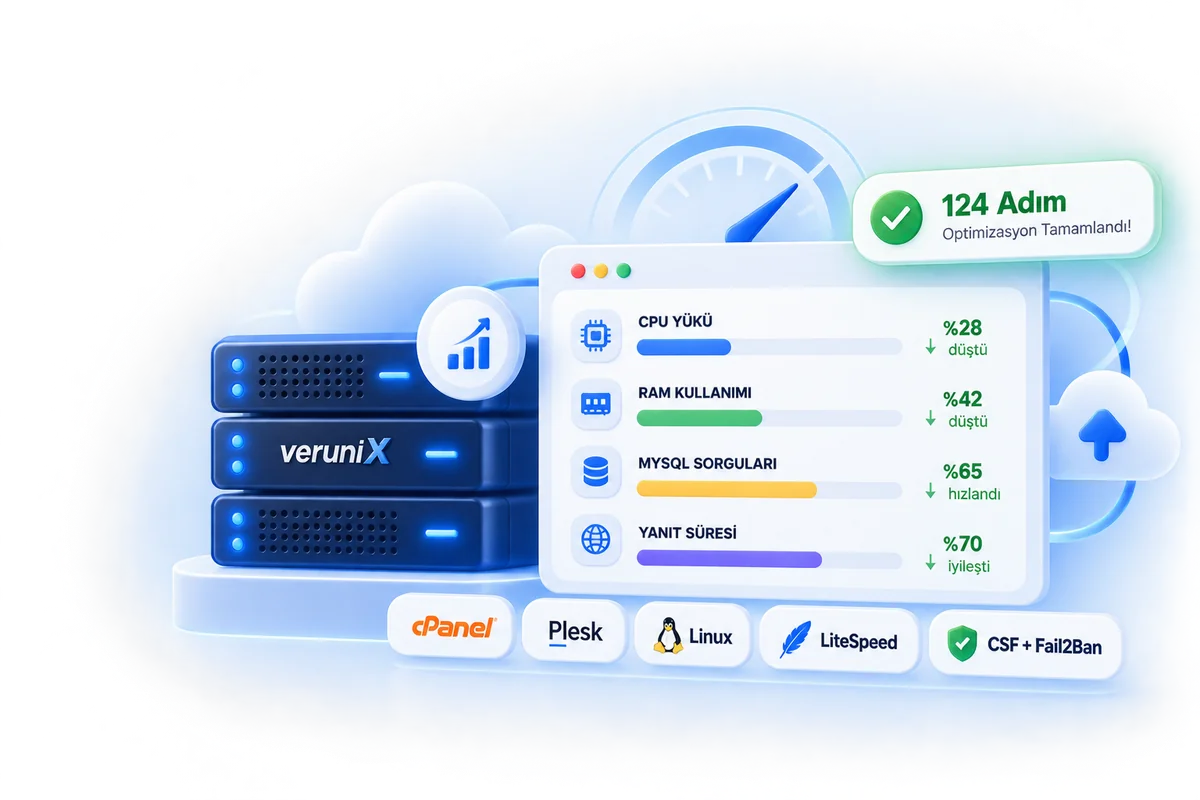
Slow websites, high CPU/RAM usage, spam and attack issues usually stem from configuration, not hardware. With our 124-step optimization and security checklist, we retune the Apache, Nginx, LiteSpeed, PHP, MySQL, CloudLinux and WordPress layers to fit your server.

A one-time fee of 4.999,90 TL. We apply the steps your server actually needs, not every step on the list. We measure first, apply second, then measure again. 30 days of post-implementation monitoring and 24/7 technical support are included.

cPanel & Plesk Compatible Also applies to servers without a control panel
Before / After Report Every change is documented
Zero-Downtime Implementation Safe transition with configuration backups
Delivered in 1-3 Days From analysis to verification
View Package Talk to an Expert
Verunix Server Optimization: performance and security for cPanel, Plesk and Linux servers

Server Optimization Package

One package, one-time fee. Your server is analyzed and the steps it needs from the checklist are applied; the preliminary analysis is free.

One-Time · Tailored to Your Needs

Professional Server Optimization

A 124-step performance and security checklist: the steps that suit your server are identified and applied. For cPanel, Plesk and panel-free Linux servers.

4.999,90TLone-time · per server
1-3 daysDelivery time
30 daysMonitoring and support
FreePreliminary analysis
Package Contents
  • Needs analysis: the steps your server requires are identified from the 124-step checklist and applied
  • Web server & PHP optimization (24 steps)
  • Server security: CSF, Fail2Ban, ModSecurity, SSH (30 steps)
  • MySQL / MariaDB optimization and security (25 steps)
  • CloudLinux, CageFS, LVE limits and PHP Selector
  • Mail & DNS deliverability settings: SPF, DKIM, DMARC, rDNS
  • cPanel / Plesk installation, hostname, NS and PHP version configuration
  • Disk, log, swap, kernel and service optimization
  • WordPress cache, Redis, cron and security settings
  • Before / after benchmark report and a list of applied changes
  • 30 days of post-implementation monitoring and free fixes
  • Also available for servers not hosted with Verunix

License fees for LiteSpeed, CloudLinux, Imunify360 and KernelCare are not included; you can use your existing license.

Optimization Scope

The package includes 124 steps across 8 categories. Each step is applied if it suits your server's setup.

Web Server & PHP

24 steps
  • LiteSpeed Installation and OptimizationInstalling LiteSpeed, activating the license, and configuring LSCache and performance settings. license required
  • Apache + LiteSpeed Server API / mod_lsapiInstalling mod_lsapi on Apache and optimizing PHP execution performance.
  • Apache + PHP-FPM OptimizationTuning PHP-FPM pools, processes and resource limits to match server capacity.
  • Apache + PHP-FPM + Proxy NginxPerformance-focused configuration of an Nginx reverse proxy with Apache/PHP-FPM.
  • Apache OptimizationOptimizing Worker/MPM, KeepAlive, timeout and connection limits.
  • Nginx OptimizationOptimizing worker, buffer, timeout, cache and connection settings.
  • HTTP/2 SettingsEnabling HTTP/2 support and improving concurrent connection performance.
  • HTTP/3 and QUIC SettingsConfiguring HTTP/3 and QUIC on supported web servers.
  • Gzip CompressionApplying compression to HTML, CSS, JavaScript and other text-based content.
  • Brotli CompressionReducing page sizes with Brotli compression on supported servers.
  • Browser Cache OptimizationConfiguring mod_expires, Cache-Control and browser cache lifetimes.
  • ETag OptimizationConfiguring ETags to reduce unnecessary re-downloads of static files.
  • SSL/TLS OptimizationOptimizing TLS versions, cipher suites and HTTPS security settings.
  • SSL Session Cache SettingsReducing SSL processing overhead on repeat HTTPS connections.
  • PHP OPcache InstallationBoosting PHP performance by keeping compiled PHP code in memory.
  • Memcached InstallationReducing application load by caching data and objects in RAM.
  • Redis Installation and OptimizationInstalling the Redis cache service and configuring it for WordPress/PHP applications.
  • PHP Imagick InstallationAdding ImageMagick-based advanced image processing support to PHP.
  • PHP Sodium InstallationInstalling the Sodium PHP module for modern cryptographic operations.
  • PHP Phalcon InstallationInstalling the PHP module required by projects built on the Phalcon Framework.
  • PHP Extension CheckIdentifying missing or unnecessary PHP modules and cleaning up the PHP environment.
  • TCP / RTT OptimizationOptimizing TCP connection parameters for latency and connection performance.
  • TCP Keepalive OptimizationManaging long-lived connections more efficiently.
  • Kernel Network OptimizationOptimizing kernel network buffers, connection queues and TCP parameters.

Server Security

30 steps
  • Kernel-Based Symlink ProtectionKernel-level protection against symbolic link attacks between users.
  • Mod_userdir SettingsControlling or disabling access to websites via ~username.
  • Open_basedir SettingsEnsuring PHP users can access only permitted directories.
  • ModSecurity SettingsInstalling and tuning ModSecurity rules against web attacks.
  • ModSecurity False Positive TuningAdjusting rules that mistakenly block legitimate requests.
  • WordPress Brute Force ProtectionApplying rate-limit-based protection to areas such as wp-login.php and XML-RPC.
  • XML-RPC ProtectionLimiting attacks carried out through WordPress XML-RPC.
  • PHP.ini Security SettingsTuning PHP upload, execution, memory and security parameters.
  • PHP Disable Functions SettingsRestricting potentially risky PHP functions in a controlled way.
  • Exec / Symlink / Perl / CGI CheckReviewing services and features on the server that could pose a security risk.
  • CGI Security SettingsControlling CGI usage and disabling unnecessary CGI access.
  • Perl Security CheckReviewing Perl execution permissions and where Perl is used.
  • Chroot CheckRestricting the areas users can access on the system.
  • Disabling Directory ListingPreventing visitors from viewing file listings.
  • Sensitive File Access ProtectionBlocking web access to .env, .git, config and backup files.
  • File Permissions CheckAuditing website file and directory permissions for security.
  • Changing the SSH PortReducing automated attacks by changing the default SSH port.
  • SSH Root Login ControlSecurely restricting SSH access for the root user.
  • SSH Security OptimizationTuning SSH connection, timeout and authentication settings.
  • Brute Force ProtectionLimiting brute force attacks against SSH, FTP, mail and panel services.
  • Fail2Ban InstallationCreating rules that automatically block repeated failed logins.
  • CSF Firewall InstallationConfiguring the CSF firewall for port, connection and attack control.
  • iptables / nftables ConfigurationConfiguring server-level inbound and outbound traffic rules.
  • Port Security CheckIdentifying and closing unnecessary open ports.
  • Connection Limit SettingsLimiting the number of connections a single IP address can open.
  • SYN Flood ProtectionKernel and firewall-level countermeasures against heavy SYN floods.
  • ICMP Security SettingsRestricting ICMP traffic according to the server's needs.
  • Rootkit CheckScanning the system for rootkits and suspicious system changes.
  • Malware File ScanChecking for shells, backdoors and suspicious files within defined limits.
  • Web Shell CheckScanning web directories for common malicious PHP shell signatures.

CloudLinux & Hosting Security

8 steps
  • CloudLinux InstallationInstalling the CloudLinux operating system and integrating it into the hosting environment. license required
  • CageFS InstallationIsolating hosting users from one another and restricting their access to system files.
  • LVE Limit SettingsSetting per-user CPU, RAM, I/O, EP and process limits.
  • PHP Selector SettingsLetting users run different PHP versions and PHP modules.
  • Alt-PHP ConfigurationInstalling CloudLinux alt-php versions and configuring the required modules.
  • KernelCare InstallationApplying kernel updates without a reboot. license may be required
  • Imunify360 InstallationConfiguring Imunify360 against malware, brute force and web attacks. license required
  • ImunifyAV ConfigurationScanning websites for malware and reporting the results.

MySQL / MariaDB

25 steps
  • General MySQL / MariaDB OptimizationOptimizing the database service for your RAM, CPU and disk setup.
  • InnoDB Buffer Pool SettingsSizing the buffer pool so frequently used data stays in RAM.
  • InnoDB Log OptimizationOptimizing redo log settings to improve performance under heavy write workloads.
  • MySQL Connection LimitsTuning maximum concurrent connections and per-user connection limits.
  • MySQL Thread SettingsTuning thread parameters so database connections are handled more efficiently.
  • Enabling the Slow Query LogConfiguring the slow query log so slow-running SQL queries can be identified.
  • Slow Query AnalysisIdentifying SQL queries that strain the server or take a long time to run.
  • Query OptimizationEvaluating resource-intensive queries for performance.
  • MySQL Index CheckChecking tables for missing or unnecessary indexes.
  • Table Cache OptimizationTuning table cache values for frequently used tables.
  • Temporary Table OptimizationAdjusting memory limits to reduce temporary tables created on disk.
  • MySQL Sort Buffer SettingsOptimizing the buffer values used for sort operations.
  • Join Buffer SettingsOptimizing resource usage during JOIN operations.
  • MySQL Packet LimitsAdjusting data transfer limits such as max_allowed_packet to fit your application.
  • MySQL Timeout SettingsManaging idle and long-running connections more efficiently.
  • Disabling MySQL Remote AccessClosing the database service to unnecessary external network access.
  • MySQL Bind Address SettingsEnsuring the MySQL service listens only on the required IP addresses.
  • MySQL User Privilege CheckReviewing database users for unnecessary privileges.
  • MySQL Security CheckChecking for anonymous users, the test database and risky default settings.
  • MariaDB OptimizationTuning cache, InnoDB and connection parameters specific to your MariaDB version.
  • MySQL RAM Usage OptimizationSetting limits that keep the database from using more RAM than necessary.
  • MySQL CPU Usage OptimizationApplying server settings that reduce the CPU load of heavy queries.
  • MySQL Disk I/O OptimizationReducing the disk load of database read/write operations.
  • MySQL Max Connections SettingSetting a safe maximum number of connections based on server capacity.
  • MySQL Backup CheckVerifying that database backups work and are configured correctly.

Mail & DNS

8 steps
  • SMTP Security SettingsChecking mail services for open relays and abuse.
  • Mail Queue CheckReviewing heavy or suspicious mail queues.
  • Outbound Spam CheckDetecting abnormal mail sending from hosting accounts.
  • SPF ConfigurationDefining in DNS which servers are allowed to send mail for your domain.
  • DKIM ConfigurationConfiguring DKIM signatures so outgoing emails can be verified.
  • DMARC ConfigurationSetting up policy and reporting for SPF and DKIM validation.
  • rDNS / PTR CheckChecking the IP address's reverse DNS record for better mail deliverability.
  • DNS Security CheckChecking the DNS service for recursion, zone transfers and unauthorized access.

cPanel / Plesk

10 steps
  • cPanel InstallationInstalling cPanel/WHM, activating the license and performing the basic server configuration.
  • Plesk InstallationInstalling Plesk and getting hosting services up and running.
  • Hostname ConfigurationSetting up the server hostname, DNS and reverse DNS.
  • Nameserver ConfigurationCreating custom nameservers and configuring the DNS service.
  • DNS Zone CheckReviewing domain DNS records and zone configurations.
  • PHP Version ConfigurationConfiguring the PHP versions and handlers used on the server.
  • Outdated PHP Version CheckIdentifying outdated PHP versions that may pose a security risk.
  • EasyApache ConfigurationRebuilding and configuring Apache and PHP components as needed.
  • Cron Job CheckReviewing unnecessary or resource-heavy cron jobs.
  • Hosting Account LimitsAdjusting disk, traffic, CPU and other account limits to fit your hosting setup.

Disk & System

10 steps
  • Disk Usage AnalysisIdentifying directories that take up unnecessary or excessive disk space on the server.
  • Log File OptimizationConfiguring log rotation for oversized system and web logs.
  • Tmp Directory SecurityConfiguring security options for /tmp and similar temporary directories.
  • Swap OptimizationTuning swap usage so the system stays stable when RAM runs low.
  • Swappiness SettingsOptimizing Linux swap behavior for the server's workload.
  • File Descriptor LimitsRaising open file and socket limits on high-traffic servers.
  • Process LimitsAdjusting per-user and per-service process limits.
  • Systemd Service OptimizationDisabling unnecessary services and adjusting startup settings for the required ones.
  • Kernel Parameter OptimizationOptimizing sysctl parameters for hosting and web server workloads.
  • Time / NTP SynchronizationSynchronizing the server clock with reliable NTP servers.

WordPress

9 steps
  • WordPress Cache OptimizationReducing WordPress response times by configuring page and object caching.
  • WordPress LSCache ConfigurationConfiguring the LSCache plugin to work with the server on LiteSpeed-based systems.
  • WordPress Redis Object CacheSetting up Redis Object Cache to reduce database queries.
  • WordPress Cron OptimizationReplacing heavy wp-cron requests with a real system cron job.
  • WordPress Heartbeat OptimizationLowering CPU usage by cutting down unnecessary AJAX requests.
  • WordPress XML-RPC ProtectionLimiting brute force and pingback attacks through XML-RPC.
  • WordPress Login Rate LimitLimiting excessive login attempts through wp-login.php.
  • WordPress File SecurityChecking access permissions for wp-config.php and other critical WordPress files.
  • WordPress Database OptimizationReviewing unnecessary transients, revisions and database records.

How Does the Process Work?

We don't change settings at random. Every server is measured first, then tuned, then measured again.

01 · ANALYSIS

Baseline measurement

We review CPU, RAM, disk I/O, traffic profile, PHP/MySQL versions and the current configuration. Response times and resource usage are recorded.

02 · DIAGNOSIS

Bottleneck report

We pinpoint the sources of slowness and security vulnerabilities, and agree with you on which steps will be applied and which ones require a license.

03 · IMPLEMENTATION

Controlled changes

A configuration backup is taken, and the steps are applied during low-traffic hours without downtime. Any operations that require a restart are scheduled with you.

04 · VERIFICATION

Before / after report

The same measurements are repeated and the gains are reported. The server is monitored for the agreed period, with fine-tuning if needed.

Required Licenses

Some optimization steps require commercial software. You can get licenses through Verunix on a monthly basis and have them installed as part of the optimization.

  • If you already have a license, we'll use it, so there's no need to buy it again
  • Installation and configuration are included in the optimization fee
  • Monthly billing, no commitment
View all licenses →

What Is Server Optimization and Why Do You Need It?

Server optimization means reconfiguring a VDS or dedicated server's web server (Apache, Nginx, LiteSpeed), PHP, MySQL/MariaDB, operating system resources and security layers to match the server's hardware, the number of sites it hosts and its traffic. The goal is not to add hardware, but to get the maximum performance out of the hardware you already have.

The default settings that ship with cPanel or Plesk are safe but conservative values chosen so they "work on any server." A server with 2 GB of RAM and one with 64 GB of RAM start out with the same InnoDB buffer pool, the same number of PHP-FPM processes and the same Apache worker limits. That's why even a powerful new server can run slowly when it's misconfigured, and upgrades made because "the server isn't powerful enough" are often unnecessary.

What problems does server optimization solve?

  • High TTFB (time to first byte) and slow-loading pages
  • CPU maxing out at 100% and RAM usage ballooning when visitor numbers rise
  • MySQL lockups, "too many connections" and 503 errors
  • Hidden resource drain caused by brute force attempts, spam and malicious files
  • Server-side delays that drag down Core Web Vitals and SEO scores

At Verunix, this work follows a 124-step checklist: measure first, apply second, then measure again. Every change is reported, and a configuration backup is kept for rollback.
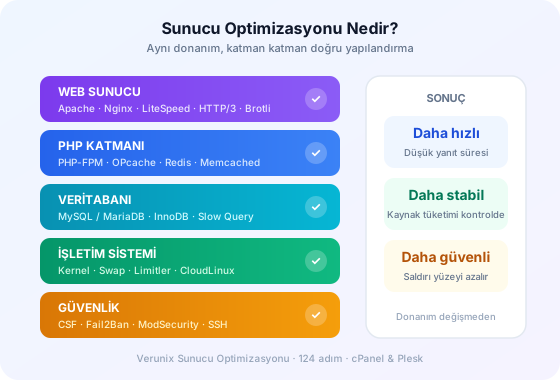
What is server optimization: web server, PHP, database, operating system and security layers

Boosting Performance with LiteSpeed on cPanel and Plesk Servers

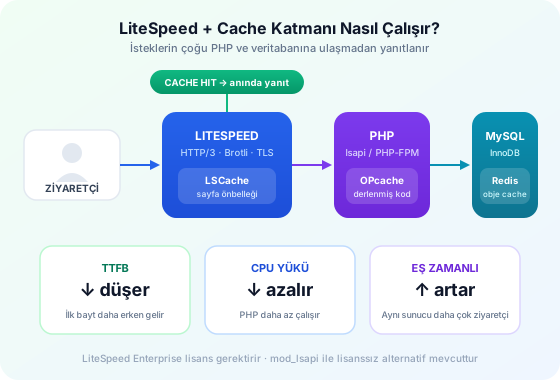
LiteSpeed Web Server is fully compatible with Apache (.htaccess, mod_rewrite), so cPanel and Plesk servers can switch to it without downtime, and its event-driven architecture handles far more concurrent connections on the same hardware. The component that really makes the difference is LSCache: it provides server-level full-page caching for WordPress, WooCommerce, Joomla, Magento and OpenCart. A request served from cache never runs PHP or touches the database at all.

What does LiteSpeed optimization cover?

  • LiteSpeed installation, license activation and a zero-downtime migration from Apache
  • HTTP/3 and QUIC, Brotli compression and TLS session caching
  • Per-site LSCache configuration, ESI, and Redis integration for object caching
  • Scaling OPcache and lsapi settings on the PHP side to your CPU/RAM
  • Per-user resource limits (LVE) together with CloudLinux

If you'd rather not buy a license: installing mod_lsapi on Apache brings LiteSpeed's PHP execution layer to Apache without a license, delivering noticeable CPU savings compared to PHP-FPM. The free preliminary analysis determines which path suits your server. You can get LiteSpeed licenses from our licenses page.

Request flow with LiteSpeed, LSCache, OPcache and Redis: as the cache hit rate rises, PHP and MySQL load drops

The Hidden Causes of a Slow Server: MySQL and Security

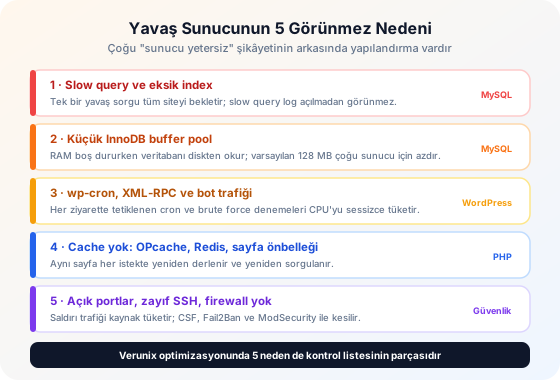
When sites slow down, the web server is usually the first place people look, yet in most cases the bottleneck lies in MySQL and in unwanted traffic reaching the server. A single unindexed query can lock up the database with just 50 concurrent visitors and leave every site waiting. The default 128 MB InnoDB buffer pool forces the database to read everything from disk while RAM sits idle.

What MySQL / MariaDB optimization includes

  • The slow query log is enabled, and queries that strain the server as well as missing indexes are identified
  • Buffer pool, log files, table cache, sort/join buffers and max_connections are scaled to your RAM
  • Temporary tables are kept from spilling to disk, and timeout and packet limits are adjusted to your application
  • Remote access is disabled, bind address and user privileges are tightened, and backups are verified to work

Why is security a performance issue?

Bots hammering wp-login.php with hundreds of attempts per minute, XML-RPC pingback attacks and port-scanning traffic eat up CPU and connection limits without bringing a single real visitor. CSF firewall, Fail2Ban, ModSecurity and rate-limit rules stop this traffic before it reaches the server; the result is more resources left for real visitors and lower response times. For volumetric attacks, we recommend pairing this with Layer 7 DDoS protection.

5 hidden causes of a slow server: slow queries, buffer pool, wp-cron, missing cache, security vulnerabilities
COMMON QUESTIONS

Frequently Asked Questions About Server Optimization

Server optimization is the reconfiguration of the web server (Apache, Nginx, LiteSpeed), PHP, MySQL/MariaDB, operating system resources and security layers to match your server's hardware and traffic. At Verunix, this process follows a 124-step checklist: each step is applied if it suits your server and skipped if it's unnecessary.

We provide full coverage on servers running cPanel/WHM and Plesk. On other setups (DirectAdmin, CyberPanel, plain LAMP/LEMP), most of the web server, PHP, MySQL and security steps can still be applied; we clarify this during the preliminary analysis.

Most changes don't require a service restart. Steps that do (such as the LiteSpeed migration or MySQL parameters) are carried out at a low-traffic time agreed with you, in windows lasting just seconds. A configuration backup is taken before any critical change.

LiteSpeed Enterprise, CloudLinux, Imunify360 and KernelCare are commercial software, and installing them requires a license from the vendor. You can get the license through Verunix or use your existing one. All other steps (mod_lsapi, Redis, OPcache, CSF, Fail2Ban, ModSecurity, etc.) do not require a license.

Four stages: (1) Analysis: server resources, traffic and the current configuration are reviewed; (2) Diagnosis: bottlenecks and security vulnerabilities are reported; (3) Implementation: the agreed steps are applied; (4) Verification: the results are measured with response times, resource usage and security tests. On a typical server, the process is completed within 1-3 business days.

Yes. It can be applied to any Linux server (VDS, dedicated or cloud) that you can give us root/SSH access to. You don't need to be a Verunix customer.

With LSCache/Redis object caching, OPcache, moving wp-cron to a real cron job and limiting Heartbeat, page response times drop noticeably, while XML-RPC and wp-login protections stop brute-force-driven CPU usage. Before/after measurements are shared in the analysis report.

All applied changes are reported. After implementation, your server is monitored for the agreed period, and if an issue caused by the optimization arises during that time, we fix it free of charge. You can reach our 24/7 support team at any time.

Related Services

Optimization delivers the best results on the right hardware. Consider it together with our NVMe-based VDS server and dedicated server plans, Layer 7 DDoS protection and LiteSpeed, cPanel and CloudLinux licenses. For WordPress sites, optimized WordPress hosting is a ready-made alternative.

Ask AI
Ask AI ChatGPT, Perplexity & More
Wheel of Fortune Try your luck now!